 HappyCalendar
Group gift: how to organise one without endless chats
A group gift is the best way to give something meaningful to someone you care about. It is also the easiest way to end up in a chat with a hundred messages: who is in, how much each person puts in, what to buy, who has already paid.
Here is how to organise one in six steps, how much to chip in, how to collect the money and which mistakes to avoid. It works for a birthday, a graduation, a wedding or a leaving present at work.
How to organise a group gift in six steps
- Decide who organises and who buysIt can be the same person or two different people. The person who buys is the one who receives the money: deciding this first avoids payments sent to the wrong person.
- Make the list of who is inWrite down the names before talking about money. And check twice that the person you are celebrating is not in the group: it happens more often than you would think.
- Set the budget before choosing the giftIf you choose the gift first, the gift sets the budget. If you set the amount first, you choose the gift within what the group can spend.
- Collect ideas and voteStart from what you know about the person: their interests, what they already have, what they said they want. Everyone suggests, then you vote. One idea per person keeps the list short.
- Collect the money in one way onlyA bank transfer, a PayPal link or Revolut: pick one, and keep a list of who has already paid. That way nobody has to ask in person.
- Buy it, then think about giving itWhoever buys tells the group straight away. On the day, the gift comes with a card signed by everyone, or a video with messages from those who cannot be there.
How much to chip in
There is no right amount: it depends on the group and the occasion. There are two ways to decide, and both work.
- The same amount for everyone: the organiser suggests an amount, and each person says whether they are in or what their maximum is. It is the simplest way, and nobody wonders how much the others put in.
- Everyone puts in what they want: the organiser suggests a few amounts and each person picks their own. It works well when people in the group can afford different amounts.
Either way, one rule helps: only the organiser sees how much the others put in. The group sees who has paid, not how much.
How to collect the money
The hard part of collecting money is not the payment method: it is keeping track. The most common ways are a bank transfer to the person who buys, PayPal, Satispay and Revolut.
Use the method the person receiving the money already uses, write it in one place only and mark each payment as soon as it arrives. If someone pays in cash, mark it too: the list exists so that nobody has to remember.
Mistakes to avoid
- The person you are celebrating in the group: check the names before creating the chat, not after.
- A gift they already have: ask someone close to them, or look at their wishlist if they have one.
- Letting the gift set the budget: amount first, ideas second.
- Two people buying: one person buys, and tells everyone.
- Remembering who paid: a written list avoids awkward messages.
How HappyCalendar does it
HappyCalendar is a free iPhone app that reminds you of your people's birthdays and helps you choose the gift. The group gift is one of its parts, and it follows the same steps as this guide.
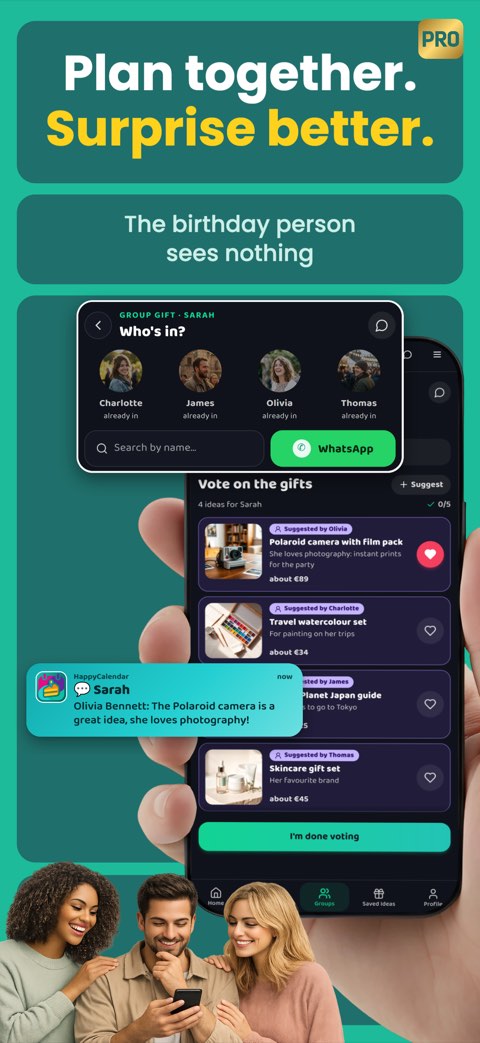
- The person you are celebrating sees nothing: the group, the chat and the ideas stay among the people taking part.
- The budget is decided in two ways, the same amount for everyone or everyone what they want, and only the organiser sees the others' amounts.
- Everyone suggests their ideas and you vote. If the person uses HappyCalendar and is one of your connections, you also see their wishlist.
- The kitty shows who receives the money and how to pay (bank transfer, PayPal, Satispay or Revolut), and shows everyone who has already paid.
- There is a group chat, separate from your everyday ones.
- The first group you organise is free. Taking part in other people's groups is always free.
Frequently asked questions
Can the person we are celebrating see the group?
Not if you set it up so they are not in it: neither in the chat nor among the people taking part. In HappyCalendar the person celebrating sees nothing of the group.
Who should buy the gift?
One person, who receives the money and tells the group as soon as they have bought it. It can be the organiser or someone else.
What if there is money left over?
Decide beforehand: give it back to everyone, add it to the gift, or use it for flowers or the cake. What matters is that one person decides and tells everyone.
Does everyone need the app?
No: you join a HappyCalendar group from the link the organiser sends, even from the website, by signing in with Apple, Google or an email. Taking part is free.